Free Trial
 Buy Now
OidView Licensing and Activation FAQ
- How do I activate the software?
- What is an Activation KEY? An Activation CODE?
- Why does your software think that something in my computer has changed?
- How do I transfer my license to a new computer?
- I got a new computer, what now?
- What is a HARDWARE-ID?
- What in my computer do you use to create the HARDWARE-ID?
- How many times can I get a new KEY once I have purchased a license?
- Can I add new hardware to my computer without invalidating the KEY?
- Can I install new software without invalidating the KEY?
- Does ByteSphere share or sell information about me or my computer?
- How do I get my HARDWARE-ID?
How do I Activate the software?
For step by step instructions, read our HOW TO ACTIVATE OIDVIEW post.Please note: You cannot open the license.key file, it is an encrypted file and only the product itself can read it. Older versions of our products used a registry key file that could be double-clicked, but we eliminated that due to email scanners stripping the activation key attachments.
What is an Activation KEY / CODE?
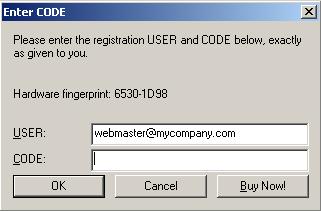
When ByteSphere software is purchased you will receive an ASCII CODE and a license KEY file named license.key. The license.key file contains information that OidView uses to determine whether or not your product should be activated and which features to unlock. The CODE is used with your EMAIL address to unlock the software with the unlock dialog box.
Why does your software think that something in my computer has changed?
This rarely happens, but if it does, simply get a new activation key online by using the online activation forms.
http://www.oidview.com/key-request-txfr.html
This is a unique number which allows our software to run on your computer indefinitely. This is NOT a MAC ADDRESS. To generate a KEY, we need a unique number from your computer called a HARDWARE-ID. This number is based on several key components of your computer. It is generated by our software and looks something like this:
09FE-A50D
Click Here to learn where to get the HARDWARE-ID.
If you change the name of your computer or reinstall the OS, the key will cease to be valid. If this occurs, you will have to transfer your license to your "new" machine. We have an online KEY transfer page. Since the whole process is automated, a license key transfer takes seconds.
What in my computer do you use to create the HARDWARE-ID?
We use anything in your computer that contains a unique fingerprint.
How many times can I get a new KEY once I have purchased a license?
When a license is purchased, is supposed to be for a single computer. Therefore, it is suggested that if you need to run our software on more than one computer, you purchase a multi-user license. When your computer is replaced or upgraded, you can easily transfer your current license to your new computer.
Yes.
How do I transfer my license key from my old computer to a new computer?
All you need is your original ORDER#, the HARDWARE-ID from the old computer, and the new HARDWARE-ID from the new computer. Then, visit the following form to transfer the license.
Can I install new software without invalidating the KEY?
Yes. No software that is installed (except an OS upgrade or replacement), will affect your activation KEY.
Does ByteSphere share or sell any information about me or my computer?
No, absolutely not!
How do I get my HARDWARE-ID / FINGERPRINT?
From within OidView: Click the Help -> Show Hardware ID.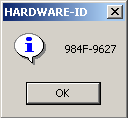
From a command line: Go to the program directory and type the name of the program and the word REGISTER. E.g.: C:\Program Files\OidView\OidView.exe REGISTER
Copy down the "Hardware fingerprint", |
If you have already purchased, click on the activation key button for the product you purchased, and you will be routed to the Activation KEY Center. If you have not yet purchased, you will need to select the product you are interested in by clicking on the "Add To Cart" BUTTON:
You will be routed to the Secure Payment Page, and your HARDWARE-ID will be entered for you automatically. When the sale is completed, your Activation KEY will be sent to you automatically. All that is left to do is to save the attachment to the program directory, and the product will become ACTIVATED. |