When developing an SNMP Agent, it is necessary to run comprehensive tests in order to check for compliance with the SNMP protocol standard and also compliance with the syntax of the MIB objects that will be represented. OiDViEW now has a built-in SNMP Agent testing module (available in the Pro and Enterprise versions), that will enable the software developer to test the agent implementation and verify that it is compliant. If an agent is not compliant then it may be impossible to manage with various Network Management Systems. The result can be devastating for a new product, as users will not be able to control it or monitor it using SNMP. Agents that are fully compliant with SNMP are often more attractive to purchasers of equipment for the data center.
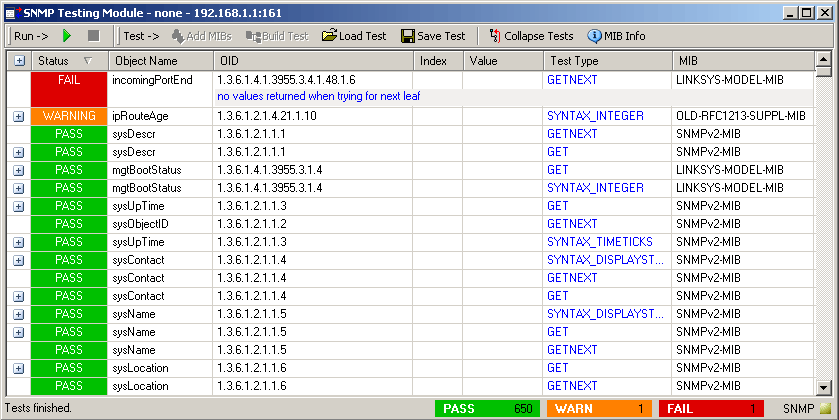
 | | SNMP Tester Screenshot |
|
Other testing frameworks costs thousands more and are harder to use. OiDViEW provides you with a simple UI and performs all the hard work behind the scenes, allowing you to spend time working rather than configuring someone else's software.
|
OiDViEW SNMP Test module is an easy to use, out of the box toolset.
Our testing suite has the following capabilities:
- Supports SNMP v1, v2c, v3 agents
- No scripting necessary
- No pre-defined tests necessary - TEST ANY ASN.1 MIB!
- Automatically creates test suites based on loaded MIBs
- No prior knowledge of SNMP necessary - easily operated
by support staff or QA and does not need an engineer
- Performs SYNTAX checking of any ASN.1 MIB
- Performs SEMANTICS checking of all SNMP operations
- Gives detailed information about why a test failed
- Test multiple agents at one time (one for each session)
- Provides summary information at bottom of window
- Save and load test suites
- Log all test results to an output file
- Sort tests by properties in window
- Collapsable and expandable test instance information
- Competitively priced
Unlike other SNMP Testing Toolkits, OiDViEW automatically creates the tests for you. There is no need to script or modify text files, and no prior knowledge of SNMP MIBs is required! You simply compile the MIBs you are interested in testing against an agent, create a session against the agent you wish to test, and press the button. That's it! OiDViEW will do the rest.
When a test suite is built, based on the configuration options OiDViEW will automatically create a number of tests for each object. Creation of these test types can be controlled from the OiDViEW Options dialog. Each of these individual test types are listed to the right on the sidebar.
Once OiDViEW has created the tests for you, all that is left to do is to press the RUN button. OiDViEW's SNMP Tester will quickly run through all the tests, and as it goes mark each one PASS, FAIL, or WARNING, based on the results (or lack thereof), it receives. Then, the results can be analyzed, modified, or saved. A modified or saved test can be re-run at a later date. Logs of test runs can be compared to see what has changed in the agent. Also, results can be saved to a variety of formats, including XML, ASCII TEXT, and CSV.
|
|
 Buy Now
 Free Trial